The idea sounds crazy—but it’s already possible:
a one-person software company powered by AI agents.
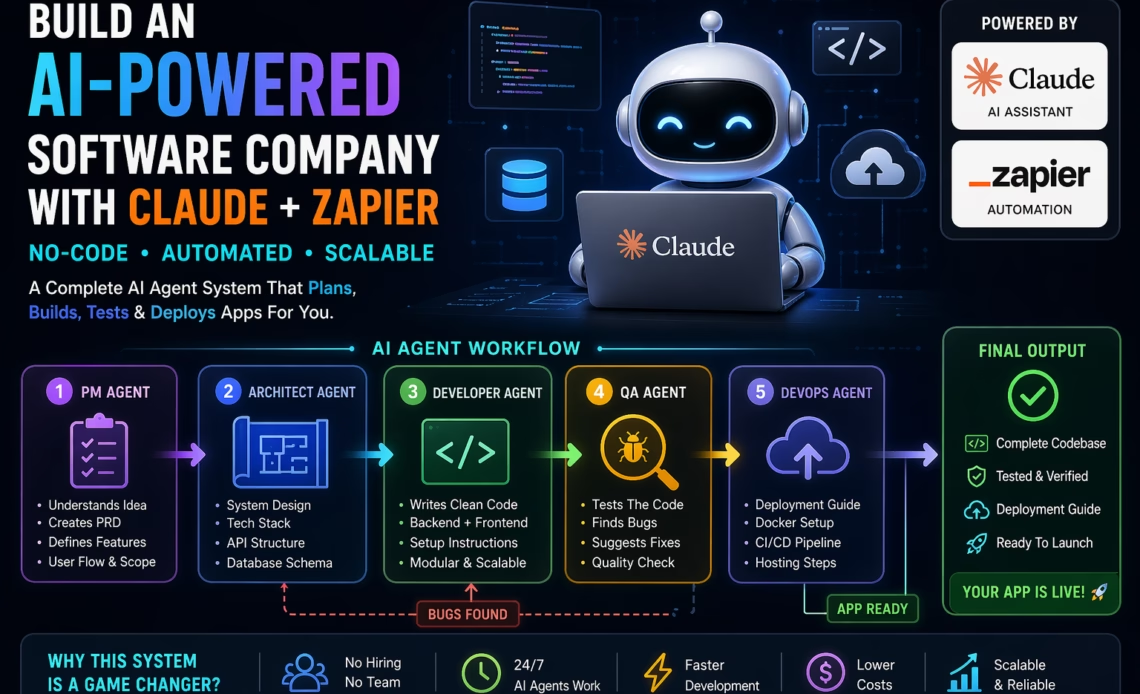
Using Anthropic’s Claude and automation tools like Zapier, you can create a system where AI handles product planning, coding, testing, and even deployment.
This guide shows:
- A complete AI agent architecture
- A no-code setup using Zapier + webhooks
- Ready-to-use Claude prompts
- A practical automation flow
🧠 What Is an AI Software Company?
An AI software company replaces human roles with specialized AI agents:
- Product Manager → defines features
- Architect → designs system
- Developer → writes code
- QA → tests bugs
- DevOps → deploys
Instead of hiring a team, you orchestrate AI workflows.
🏗️ AI Agent Architecture (Simple Overview)
User Idea
   ↓
Orchestrator (Zapier)
   ↓
AI Agents (Claude)
   ↓
Storage (Docs / DB)
   ↓
Final Output (App / Code / Docs)
Each step is automated using triggers and actions.
⚙️ No-Code Setup Using Zapier + Webhooks
🔹 Tools You’ll Need
- Zapier (automation engine)
- Claude API (via webhook)
- Google Docs / Notion (storage)
- Webhook.site (testing)
🔧 Step-by-Step Workflow
1. Trigger (Start the System)
- App: Zapier Trigger
- Event: “New Form Submission” or “Webhook”
- Input:
- App idea
- Features
- Target users
2. PM Agent (Claude via Webhook)
👉 Action: Webhooks by Zapier → POST
Endpoint: Claude API
Body:
{
  "prompt": "You are a product manager. Create a PRD for: {{user_input}}"
}
Output Stored In: Google Docs / Notion
3. Architect Agent
- Triggered after PM step
- Sends PRD to Claude
Prompt:
Design system architecture based on this PRD:
{{PRD_OUTPUT}}Return:
- Tech stack
- APIs
- DB schema
4. Developer Agent
Prompt:
Build full working code based on:
{{ARCHITECT_OUTPUT}}Return:
- Backend
- Frontend
- Setup steps
Store output in:
- GitHub (via Zapier integration)
- or Google Drive
5. QA Agent
Prompt:
Test this code:
{{CODE_OUTPUT}}Return:
- Bugs
- Fix suggestions
👉 Add filter:
- If bugs found → loop back to Dev Agent
6. DevOps Agent
Prompt:
Prepare deployment guide for:
{{FINAL_CODE}}Include:
- Docker
- Hosting steps
- CI/CD
7. Final Output
Zapier compiles everything into:
- Google Doc
- Dashboard
🔄 Automation Logic (Important)
In Zapier, add:
- Paths / Filters
- If QA fails → send back to Dev
- If success → continue
- Delays
- Prevent API overload
- Storage
- Save outputs between steps
🧠 Best Claude Prompts (Optimized)
Product Manager Prompt
Act as a senior product manager.
Create a detailed PRD with:
- Features
- User flow
- MVP scope
Developer Prompt
Act as a senior developer.
Write clean, production-ready code.
Avoid placeholders.
QA Prompt
Act as a strict QA tester.
Break the system and find all issues.
💡 Pro Tips for Better Results
1. Use Structured Outputs
Ask Claude for:
- JSON format
- Sections
- Bullet points
2. Chain Context Properly
Each agent should receive:
- Previous output
- Clear instructions
3. Limit Token Size
Split large tasks:
- Feature-wise
- Module-wise
4. Add a “Reviewer Agent”
Final check improves quality drastically.
🚀 Use Cases
- Build SaaS apps automatically
- Create MVPs in hours
- Launch AI dev agency
- Sell “AI-built apps”
💸 Monetization Ideas
- Subscription: “Build your app with AI”
- AI-powered dev agency
- Template marketplace
- White-label solutions
🔮 Future of AI Software Companies
We’re moving toward:
- Solo founders with AI teams
- Automated SaaS factories
- AI-first startups
Soon, execution speed > team size.
✅ Final Thoughts
This isn’t theory—it’s a practical system you can build today.
Start simple:
- 2–3 agents
- One Zap
- One use case
Then scale into a fully autonomous AI company.